Step 1 — Create GitHub Repository First
First, create a new GitHub repository for your Laravel package.
https://github.com/newRepository name:
laravelpackageExample repository URL:
https://github.com/gituser/laravelpackageStep 2 — Clone Repository on Local System
After creating the repository, clone it into your local development directory.
cd c:\wamp64\www
git clone https://github.com/gituser/laravelpackage.git
cd laravelpackage
Step 3 — Create Laravel Package Structure
Your final package folder should look like this:
c:\wamp64\www\laravelpackage

├── .git/
├── .gitignore
├── README.md
├── composer.json
├── config/
│   └── laravelpackage.php
└── src/
    ├── LaravelPackageServiceProvider.php
    ├── Logger.php
    ├── EventBuilder.php
    ├── BreadcrumbRecorder.php
    ├── Redactor.php
    ├── ApiClient.php
    └── Jobs/
        └── ShipErrorEventJob.php
Inside composer.json, define your package name:
{
  "name": "gituser/laravelpackage",
  "description": "A professional Laravel package for application monitoring and error reporting.",
  "type": "library",
  "license": "MIT"
}
Step 4 — Commit Initial Package Code
Once your package files are ready, commit them to Git.
git status
git add .
git commit -m "Initial Laravel package release"
Step 5 — Push Code to GitHub
Push your initial package code to the GitHub repository.
git push origin mainStep 6 — Create First Version Release
Create your first version tag. Composer and Packagist use Git tags to identify package versions.
git tag v0.1.0
git push origin v0.1.0
Note: Always create a version tag when releasing a package. Without tags, users may only get the unstable dev-main version.
Step 7 — Register Package on Packagist
After pushing your first version tag, register the package on Packagist.
https://packagist.org/Login using your GitHub account, then open:
https://packagist.org/packages/submitPaste your GitHub repository URL:
https://github.com/gituser/laravelpackageThen click:
Check → SubmitPackagist will read your composer.json file and register your Laravel package.
Step 8 — Install Package in Laravel Projects
Once published, users can install your package using Composer.
composer require gituser/laravelpackageStep 9 — Deploy Updated Versions
Whenever you update the package, commit the changes and create a new version tag.
git add .
git commit -m "Added new feature"
git tag v0.2.0
git push origin main
git push origin v0.2.0
Packagist will automatically sync the new version.
Step 10 — Semantic Versioning Rules
Use proper version numbers so users can safely update your package.
Bug Fix
Version:
v0.1.0 → v0.1.1

Meaning:
Small fixes without changing existing features.
New Feature
Version:
v0.1.0 → v0.2.0

Meaning:
New functionality added without breaking old usage.
Breaking Change
Version:
v0.1.0 → v1.0.0

Meaning:
Major changes that may require users to update their code.
Step 11 — Best Practices
Always create version tags for releases.
Keep your
README.mdclear and updated.Maintain a
CHANGELOG.mdfile for release history.Push both the branch and the version tag.
Keep old versions available for existing users.
Use meaningful commit messages.
Document installation, configuration, and usage examples properly.
Never do this: Do not delete old tags, do not force-push release tags, and do not publish production packages without proper version tags.
Step 12 — Optional: Add GitHub Release Notes
You can create release notes on GitHub for every new version.
https://github.com/gituser/laravelpackage/releasesExample release note:
v0.2.0

- Added breadcrumb support
- Improved queue handling
- Updated README documentation
Step 13 — Optional: Enable Packagist Webhook
After package registration, Packagist may suggest enabling a GitHub webhook. Enable it so new package versions sync quickly whenever you push a new tag.
After your package is registered on Packagist, you can enable a GitHub webhook so Packagist automatically updates whenever you push new commits or version tags.
Without the webhook, Packagist checks GitHub periodically, which may delay new package versions from appearing. With the webhook enabled, updates usually sync within a few seconds.
Step 13.1 — Open Your Package on Packagist
Open your package page on Packagist:
https://packagist.org/packages/gituser/laravelpackageAfter registration, Packagist may show a notification suggesting webhook setup.
Step 13.2 — Generate Packagist API Token
Open your Packagist account settings:
https://packagist.org/profile/Generate or copy your existing API token.
Example token:
1234567890abcdefghijklmnopqrstuvwxyzImportant: Never share your Packagist API token publicly.
Step 13.3 — Open GitHub Repository Webhook Settings
Open your GitHub repository:
https://github.com/gituser/laravelpackageNavigate to:
Settings → Webhooks → Add webhookStep 13.4 — Configure the Webhook
Use the following webhook URL:
https://packagist.org/api/github?username=YOUR_PACKAGIST_USERNAME&apiToken=YOUR_PACKAGIST_API_TOKENExample:
https://packagist.org/api/github?username=gituser&apiToken=1234567890abcdefghijklmnopqrstuvwxyzConfigure these settings:
Content type:
application/json

Events:
Just the push event

Active:
Checked
Step 13.5 — Save the Webhook
Click:
Add webhookGitHub will now notify Packagist automatically whenever:
You push code to the repository
You create a new version tag
You publish a new release
Step 13.6 — Test Automatic Sync
Push a new version tag:
git tag v0.2.0
git push origin v0.2.0
Then refresh your package page on Packagist:
https://packagist.org/packages/gituser/laravelpackageThe new version should appear automatically within a few seconds.
Recommended: Always use webhooks for production Composer packages to ensure fast and reliable package synchronization between GitHub and Packagist.
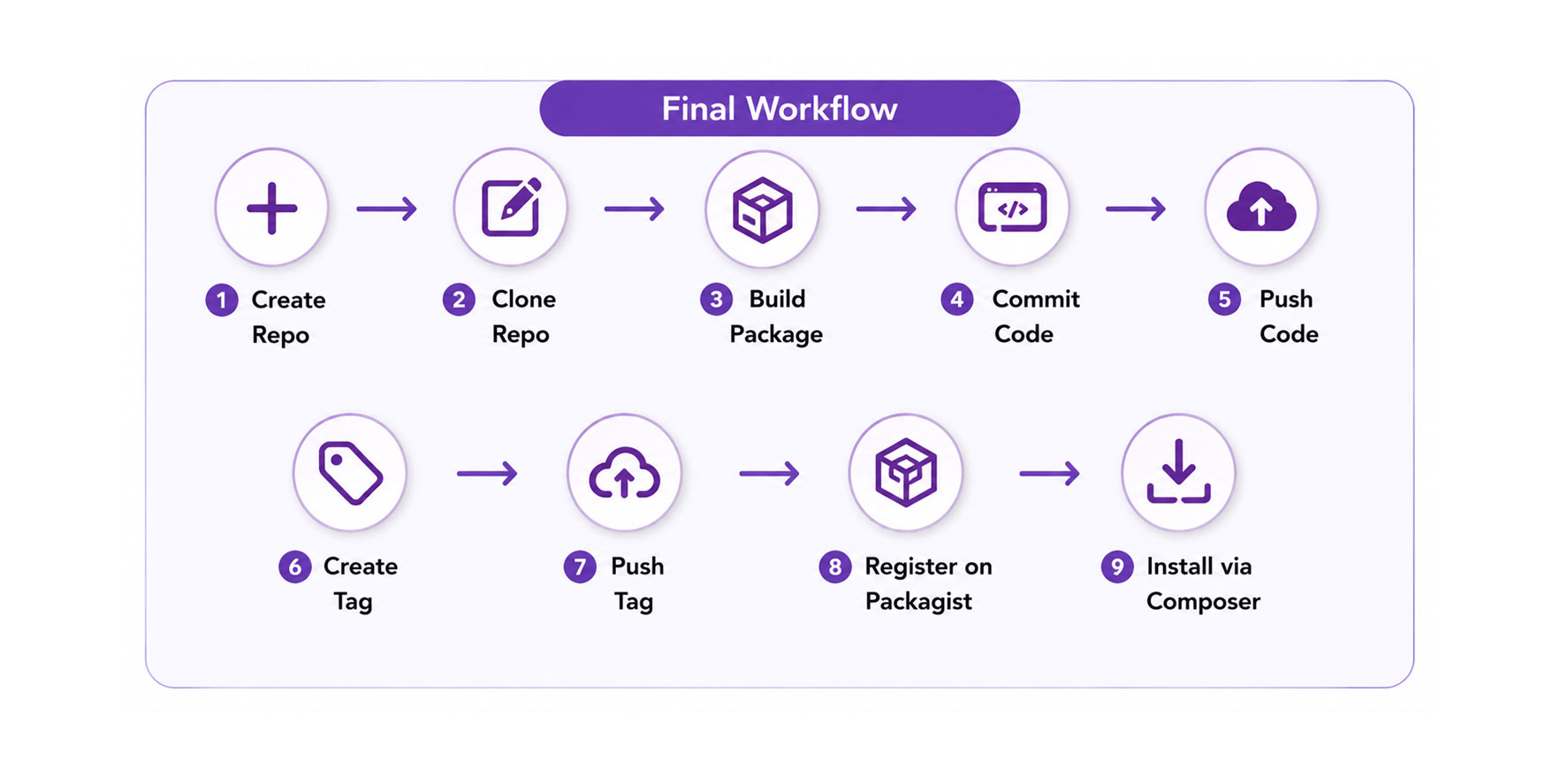
Final Workflow
Create GitHub Repository → Clone Repository → Build Package → Commit Code → Push Code → Create Tag → Push Tag → Register on Packagist → Install via Composer
This is the standard professional workflow for building, publishing, versioning, and maintaining Laravel Composer packages.